Intiveo Voice

Integrated call management that works with the phone provider you already trust — no vendor lock-in.

Image
Image

Voice with Choice

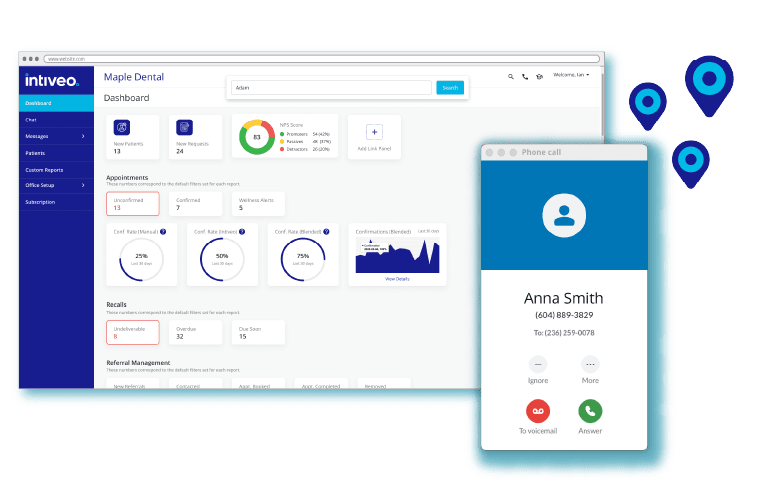
Intiveo Voice integrates with the major VoIP systems — RingCentral,  AT&T,  Zoom, TELUS and more — to simplify call workflows so your team can focus more on building strong patient relationships and less on coordination, helping you increase operational efficiency, reduce missed opportunities, and elevate the patient experience.

Featured Integrations

Image

Calling, made easy

Simply search by name, phone number, or other details through Global Search to instantly access patient profiles instead of navigating between screens. Plus, click on a patient’s phone number to call them directly, reducing errors.

Personalize the patient experience

When a call comes in, the Profile Panel smartly adjusts based on contact type to surface the relevant information — whether it’s a referring practice or patient.

Image
Image

Empower your staff

The actionable call log automatically logs all inbound and outbound calls in detail, enabling staff to easily follow up via text, email or phone directly from the call log. Plus, access voicemails directly in Intiveo.

Features

Global Search
Locate patients by name, phone number, or other details instantly.
Click-to-Call
Initiate calls directly from Intiveo’s platform, reducing dialling errors and saving time.
Call Recognition with Caller ID+

When a patient, referring office or other contact calls, Intiveo recognizes them and displays relevant information.

Profile Panel
One-click access to essential contact details, workflows, and tools based on contact type.
Call Management and Actionable Logs
Automatically log inbound/outbound calls, voicemails, and follow-up actions.
Missed Call Texts
Automatically send patients a text when a call is missed to reduce lost revenue opportunities.
Extension Filtering
Use a unique phone number per office location, or a central phone number with extensions per location. Filter which location’s calls show up in which instance of Intiveo.
Two-way Number Masking
Assign multiple phone numbers to one extension to receive and track inbound calls, and call outbound from multiple phone numbers but appear as one unified patient-facing number.
Restricted Access
Keep sensitive call logs private by excluding or limiting access based on phone number for added security.
Multi-Account Linking
Link multiple phone accounts from different providers to one Intiveo multi-location account, or link the same phone account to multiple Intiveo single-location accounts.
Multi-Location Profile Panel
See all upcoming appointments for a patient regardless of location. Appointments, referrals and tasks will be tagged with the location name and filterable.

Trusted by 14,000+ Dental Practices

Image